
First Year Centre
The First Year Centre is your go-to resource for everything you need to know about being a first year student at the University of Manitoba.
Review answers to common questions before reaching out to speak with an advisor—your question has likely already been answered, and you may find what you need right away!
How Do I...
Contact Admissions about my application or offer?
Connect directly with:
Undergraduate Admissions
424 UMSU University Centre (campus map)
1-204-474-8808
1-800-224-7713, ext. 8808
admissions@umanitoba.ca
Accept or confirm my offer of admission?
You will be notified by email when UM has an official decision about your application.
- Log in to the application portal
- Review and accept/confirm your offer by the stated deadline
Claim my UMNetID?
Activate your account at Claim Your UMNetID
Your UMNetID is required for student email (@myumanitoba.ca), Wi-Fi, UM Learn, Microsoft Teams, library access, and more
Get help with logging into my UM e-mail account?
If you have trouble logging into your UM email account, connect with UM’s IST (Information Services and Technology) Service Desk:
123 Fletcher Argue Building (campus map)
1-204-474-8600
Online chat
Mon-Fri, 8:00 am-8:00 pm (CDT/CST).
Get my Student ID card?
Visit the Photo ID Centre in the Registrar’s Office (4th floor UMSU University Centre). Remember to bring government-issued photo ID (ex. driver’s license, passport).
Activate my U-Pass (bus pass?)
Visit the UMSU Service Centre (1st floor UMSU University Centre). Remember to bring your Student ID card. You must first be registered in courses before activating the pass.
Purchase a parking pass?
Log in to the Parking Portal. To log in, you must have claimed your UMNetID.
Check the Student Parking page for fee options, sale dates, lot locations, and more.
Obtain proof of registration?
Request an enrolment verification letter after course registration.
If you have questions about your order, contact:
Registrar’s Office
400 UMSU University Centre (campus map)
(In-person visitors are required to check in to the virtual queue)
1-204-474-9420
registrar.office@umanitoba.ca
View my booklist?
Check your booklist in Aurora:
- Open Registration Dashboard
- Enrolment & Academic Records
- Student Records
- View Booklist
Some booklists may not be available until late August.
Buy my textbooks?
Order your textbooks through the UM Bookstore. Use these helpful instructions for how to order your textbooks online.
Rent a locker?
Locker rentals are managed by student associations, and usually sales start during the first weeks of each term. Use the campus map to decide which building you’d like to rent a locker in, then contact the association responsible for that building for rental information.
Arts (Tier, Isbister, Greenhouse Café tunnel, Tier-Drake connection)
Science (Allen, Armes, Duff Roblin, Parker, Machray)
St. Paul’s College
St. John’s College
Order a transcript?
Order a transcript online through Aurora.
Questions? Contact:
Registrar’s Office (Transcripts)
400 UMSU University Centre (campus map)
(In-person visitors are required to check in to the virtual queue)
1-204-474-9420
1-877-474-9420
transcripts@umanitoba.ca
Unlock my Aurora account?
To regain access to your Aurora account, create a service ticket with IST to Reset or change your password, and select Log in as a Guest.
Transfer in AP/IB credit?
- Check if your AP/IB courses are equivalent to UM courses
- Follow these instructions to transfer your AP/IB credit
- In the First Year Planning Guide, confirm whether AP/IB can courses be used to meet admission requirements for your specific target faculty/program
Find out more about University 1?
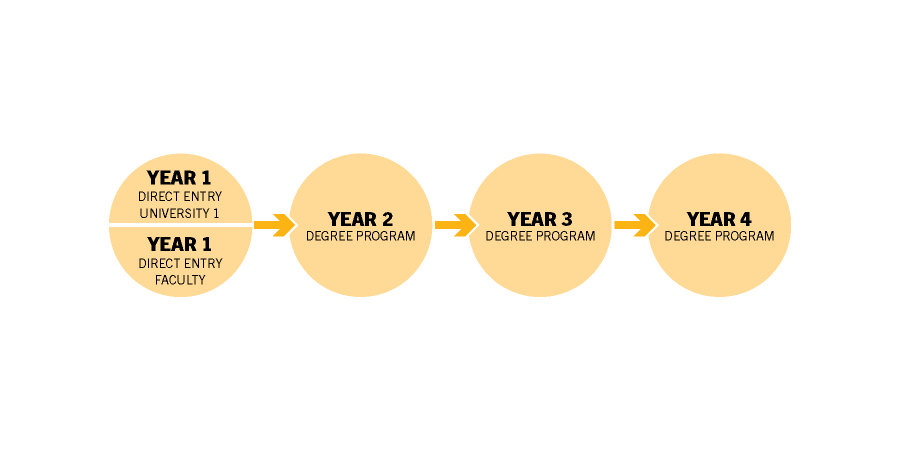
University 1 (U1) is a flexible, direct entry option
Counts as Year 1 of any 3- or 4-year degree programs
A good option if your target program doesn’t offer Direct Entry from high school
Most common direct entry program
Review University 1’s Admissions page to see if U1 is a good fit for you.
“I entered U1 because my program of choice didn’t have a direct entry option directly from high school. Something that surprised me in U1 was how many academic supports were available. The writing tutors were very helpful to me in my first year. The First Year Centre advisors were also really helpful in ensuring that I was getting all of the coursework that I needed for my desired program. If you’re not sure where to start, ask questions. Everyone is so helpful!”
SARI - Fourth year student, Faculty of Architecture
Proceed after accepting or confirming my offer of admission?
Congratulations! Review the New Student Checklist to best prepare for university.
Choose my first year courses?
Review the First Year Planning Guide and (if taking courses in Summer) the Summer Term Planning Guide.
Attend or watch our Get Ready to Register (GRTR) sessions.
These resources are designed specifically to help all new students make decisions about target programs, course selection, and registration.
Register for courses?
Review these resources:
• Get Ready to Register
• How to Register Using Aurora
• Registration errors and tips on how to resolve
Determine when to register for Fall and Winter courses?
Check your Initial Registration Time in Aurora. This is the earliest date you can register, giving you the best chance of getting into the courses you have chosen.
To check your initial registration time in Aurora, select:
- Open Registration Dashboard
- From the registration landing page, select Prepare for Registration
- In the Registration Status section, you will see your assigned Initial Registration Time
Fall and Winter Registration – General Timeline
- For more specific dates, review Important Dates & Deadlines.
Early July
- Check Initial Registration time in Aurora
Mid-July
- Initial Registration opens for new students
Late July-early August
- Initial Registration opens for returning students
September
- Fall courses begin; students can add/drop Fall courses and Fall-Winter on or before the add/drop course deadlines (usually within the first two weeks of class) without academic or financial penalties
January
- Winter courses begin; students can add/drop Winter courses on or before the add/drop course deadlines without academic or financial penalties
Determine when to register for Summer courses?
All students are assigned a specific date and time to begin registering for courses, known as your Initial Registration Time. This is the earliest date you can register, giving you the best chance of getting into the courses you have chosen.
To check your initial registration time in Aurora, select:
- Open Registration Dashboard
- From the registration landing page, select Prepare for Registration
- In the Registration Status section, you will see your assigned Initial Registration Time
Summer Registration – General Timeline
- For more specific dates, review Important Dates & Deadlines. For more information about how Summer term is different from Fall and Winter, review the Summer Term Planning Guide and our Summer Get Ready to Register video.
Mid-March
- Check Initial Registration time in Aurora
Late March-early April
- Initial registration opens for all students
May or July
- Summer courses begin
Determine the deadlines to add or drop a course?
Review and bookmark this Important Dates & Deadlines page to see the specific dates for each term, including:
- When registration opens
- When classes begin
- The last day to drop a course without academic or financial penalties
- The last day to add a course
- The last day to Voluntarily Withdraw (VW) from a course
Check my tuition fees?
Before registering for courses: For a general idea of your tuition and other fees, UM offers these fee estimates
After registering for courses: Check Aurora for your tuition and fee summary
In Aurora, select:
- View Account Summary by Term card
Your account summary may not be available until August.
Pay my tuition fees?
There are several options to pay your fees, whether you’re paying from within Canada or outside of Canada.
Speak with an Academic Advisor?
Academic advisors in the First Year Centre are available to advise students in-person and online. Online advising is through Microsoft Teams, to which all UM students have free access.
Instead of booking appointments in advance, students are seen on a drop in/walk in basis. This allows us to help as many students as possible, as quickly as possible.
To connect with an academic advisor to discuss course planning for your first year, you must first:
- Attend or watch our Get Ready to Register (GRTR) sessions, designed to help all new students make decisions about target programs, course selection, and registration in classes.
- Fill out a course plan with guidance from Get Ready to Register and the First Year Planning Guide.
- Contact the First Year Centre:
205 Tier Building
1-204-474-6209
Toll free in N. America: 1-800-432-1960, ext. 6209
Business hours: Mon-Fri, 8:30 am-4:30 pm CDT/CST
Advising hours: Mon-Fri, 9:00 am-3:30 pm CDT/CST
If you’re outside North America: Email fycentre@umanitoba.ca with your phone number and request that we call you back during our business hours.
Contact us
First Year Centre
205 Tier Building
University of Manitoba (Fort Garry Campus)
Winnipeg, MB R3T 2N2 Canada